
Towers of Fortune Wiki
Starter guidesBuild a way across the void and stay on the last pillar standing.
Towers of Fortune by 900 Pixels starts each player on a separate pillar. Use random blocks to cross gaps, fight rivals and stay alive. Find reported codes, a first-round bridging guide, and the class spin and item reference.
Getting started in Towers of Fortune
Reviewed
Your pillar is your starting foothold in Towers of Fortune. The first thing to check is the item you received and how much standing room you have. If you receive blocks, use a few to make a square place to turn before extending toward another player. If you receive a tool first, stay within reach of the pillar and watch which neighbors have begun crossing. Moving early is useful only if the next block and a path back are visible.
Before crossing the last gap, look at how the opponent can reach your bridge. A bridge that ends below their position makes it harder to recover from knockback, even if it looks fast to build. Place in short sections, stop to check the next foothold, and hold back a few blocks for a retreat or landing. The gameplay guide compares that approach with defending a route and shows where Lime Wool, Spruce Planks and several other building blocks appeared in the original arena.
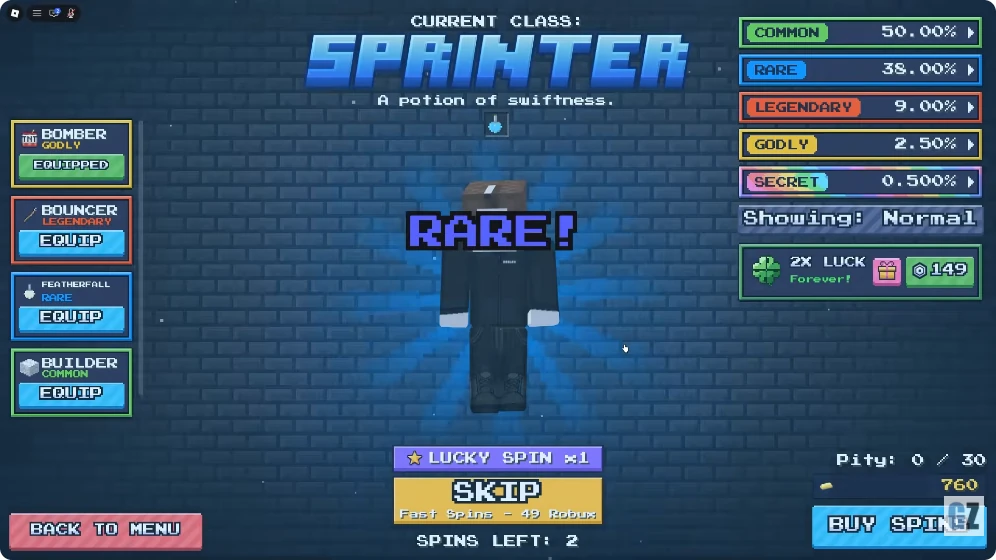
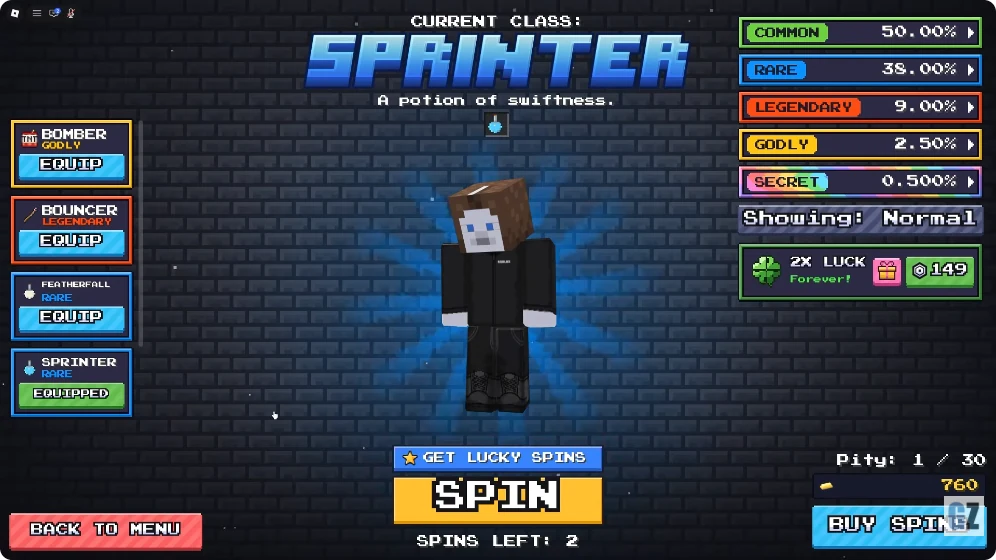
Between matches, visit Classes from the bottom of the lobby. The filmed Lucky sequence landed on Bouncer, Bomber and Sprinter. Bouncer’s card lists a Knockback Stick. Bomber lists three TNT and eight wool, while Sprinter lists a Potion of Swiftness. Watch for the Current Class heading to settle before reading the result. Scorcher and Immortal are also visible as equipped cards in a separate recording. Their first unlocks and exact rarity labels remain unverified.
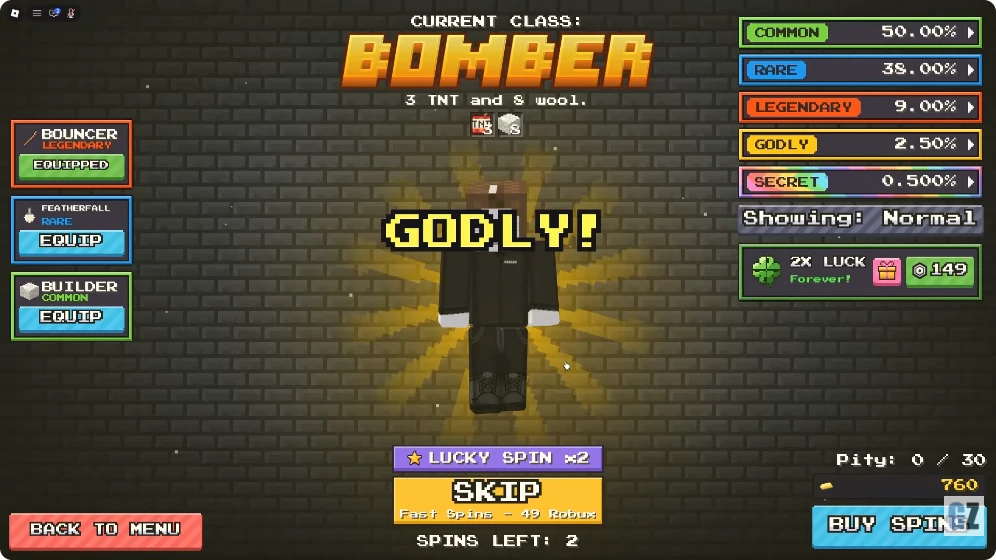
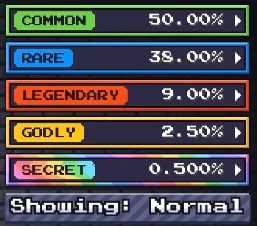
The recorded Normal table reads Common 50%, Rare 38%, Legendary 9%, Godly 2.5% and Secret 0.5%. It remains labeled Normal as the Lucky balance declines in the recorded sequence. These are dated rarity totals. The figures cannot answer how likely a named class is or what percentages Lucky rolls use. The regular and Lucky product comparisons identify which balance each offer mentions and which quantities still need a live purchase-panel check.
Code status
Roblox Den listed Release for 500 Coins on 20 November, matching the reward reported on 19 November by two other guides. Shutdown1 and Shutdown2 have conflicting current-status reports. The 900 Pixels listing contains no code list. The daily reward advertised by the developer uses its own group claim.
Read the code checkExplore the wiki.
Gameplay & guides
Beginner & Bridging Guide
Read the first hotbar grant, give yourself room to turn and build in short sections toward a safe landing. The guide covers the first crossing, how to hold a bridge and what to do with a small block supply when only a few players remain. Its original-arena examples distinguish the practical building decisions from the developer’s description of elimination bonuses and the last-player-standing win condition.
Items & Blocks
Compare the recorded names for building blocks and tools such as Snowball, Water Bucket, Ender Pearl and Knockback Stick. Screenshot timestamps show which labels appeared on the HUD or prompt. Read the separate paid return and revenge listings before spending after an elimination. The victory and death-effects notes follow the official event announcement, with prices and equip steps still open.

Classes & Spins
Look up the three settled results in the filmed Lucky sequence, the two already owned class cards and the complete displayed Normal rarity table. The Lucky counter comparison shows exactly what the panel said as the recorded balance changed. Check the official regular, Lucky and bundled offers in separate rows. The guide records inconsistencies in advertised pack quantities and leaves a dedicated Lucky table and individual class odds open.
Updates & reference
Beginner & Bridging Guide
Open on your own pillar
Each player starts on a separate pillar. Let the first random grant arrive and check your hotbar while there is still room to stand. Look at the nearest two pillars and note whether either neighbor has started building toward you.
If your first grant gives you blocks, use some to make a stable spot at the start of the route. If it gives you a combat item instead, keep it ready and wait for blocks. The developer confirms periodic random grants. The exact interval, pool and odds have not been verified.
Build across in short sections
The November gameplay screenshot shows Lime Wool extending toward a nearby pillar, with the cursor on the end block. Keep the edge and next placement in view, and confirm each block appears before stepping onto it. If you run out, retreat to the last position where you can turn without stepping into empty space.
Before entering a rival pillar, identify a landing tile and the bridge you will use to leave. If their bridge reaches you first, step back onto the wider part of your platform. Let the opponent come into view before contesting the entrance. Save a few blocks to create more room when you have to fight near the edge.
| Situation | Play to try | What to look for |
|---|---|---|
| Too few blocks | Reinforce your end and wait for another grant. | A safe tile to stand on while watching the next pillar. |
| Neighbor builds first | Hold the wide end of your platform. | Their arrival tile and your route away from the edge. |
| Crossing is open | Place a short section, confirm it, then move. | A continuous return path and enough blocks to finish. |
| Fight is at the edge | Keep solid ground behind you and leave before losing it. | The opponent's line of approach and a wider tile to return to. |
| After an elimination | Check the hotbar and coin readout, then repair your footing. | The developer advertises bonus blocks and coins. Check your own result for the amount. |
Pick a safer route in the final fight
When only a few players remain, check which existing routes are still usable before committing your remaining blocks. A wider landing lets you change direction. Keep enough room to back off when the rival is already watching the only entrance.
The developer confirms that the last player alive wins. A separate community screenshot shows the Killing Spree banner reading three kills in a row. The wool notices remain visible below the banner. The frame alone does not identify the source of each grant.
After the round, review what cost you the crossing: missing a placement, arriving without a retreat, or taking a fight on the narrowest tile. Practice that one decision in the next match.
Items & Blocks
Identify the blocks and items shown in a match
The 11 November ArenaGaming recording opens on the Roblox listing with the same cover as the 900 Pixels original, then loads the pillar arena. The guide's item labels and timecodes come from that capture, reviewed 21 November 2026. Use the displayed name to identify your current item.
Use the block colors to recognize what was held or placed in each frame. 900 Pixels also lists a 79 Robux Custom Wool Color pass with 15 color choices. The listing describes visible appearance. Relative strength, placement reach and grant rates still need live measurements.
Towers of Fortune item and block reference
| Item | Category | What the evidence supports | Where to use it |
|---|---|---|---|
| Lime Wool | Building block | The November 20 capture shows +3 Lime Wool and green blocks along a crossing. | Extend a crossing in short sections. |
| Blue Wool | Building block | A Blue Wool grant appears beside a blue extension at 02:10. | Add room at the end of an existing route. |
| Yellow Wool | Building block | A Yellow Wool grant is visible at 03:35 while the player holds a matching yellow block. | Inspect the next placement before moving. |
| Spruce Planks | Building block | The HUD shows a Spruce Planks pickup at 01:40. | Use the placement preview to check the next tile. |
| Glass | Building block | Glass appears in the grant feed at 04:45 and 05:45. | Check the outline before crossing transparent footing. |
| Dirt | Building block | The selected hotbar item is labeled Dirt at 05:25. | Check the next tile with the placement preview. |
| Snowball | Throwable | The video thumbnail reads +1 Snowball. The round footage shows a snowball held toward another pillar at 04:20–04:50. | Use the on-screen throw prompt. Hit and knockback values remain open. |
| Bow | Ranged weapon | At 01:30–01:35 the player holds a bow toward a rival across the gap, with draw and release prompts on screen. | Aim from a stable tile before releasing. Damage and range remain open. |
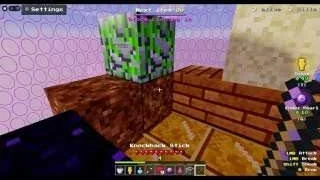
| Knockback Stick | Melee weapon | The hotbar names Knockback Stick at 05:50. | Check the Attack prompt. Knockback distance and damage remain open. |
| Water Bucket | Utility | Water Bucket is selected at 05:00. The HUD shows a Pour prompt. | Confirm where the prompt is aimed. The video frame does not establish flow duration or fall protection. |
| Ender Pearl | Utility | The HUD shows +1 Ender Pearl at 05:15. Roblox also lists a 10 Robux offer to put one in your hotbar. | Check the result and your landing before relying on it. Range and cooldown remain open. |
| Totem of Undying | Utility | The official 49 Robux offer says it adds a totem to your hotbar and can prevent one death. | Check that the item appears in your hotbar. Activation conditions need a live test. |
| Wool color options | Cosmetic | The Custom Wool Color pass lists 15 colors and a price of 79 Robux. | Compare colors in the purchase prompt if you want to change your blocks. |
| Bonus blocks | Round reward | The official experience description lists them as an elimination reward. Quantity unverified. | Secure your footing before starting another crossing. |
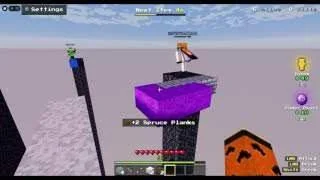
Read the held item before you use it
At 04:45 the player holds a Snowball while a Glass grant appears. Read the selected hotbar slot before acting on a new pickup notification. Use the item from a stable tile so you can watch what happens at the other end.
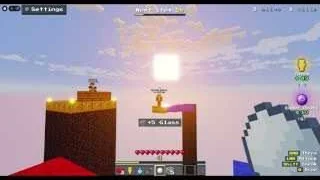
Find the Water Bucket prompt
At 05:00 the selected item changes to Water Bucket. Read the Pour prompt and check the target block. Water is visible beside a neighboring pillar in the same frame. The frame does not show who poured it.
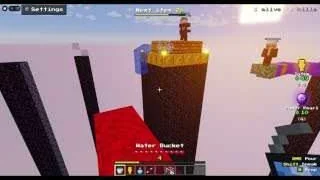
Identify an Ender Pearl grant
At 05:15 the HUD displays +1 Ender Pearl. This is one observed round grant. The separate Robux offer places a pearl into the hotbar according to the official description. Keep the free grant and paid offer separate when comparing your inventory.
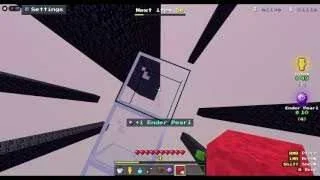
Find the Knockback Stick in the hotbar
At 05:50 the selected label reads Knockback Stick. When using it near the edge, keep a wider tile behind you and check where the opponent actually moves. The captured label confirms the item. A hit-by-hit distance is still unverified.
Compare the options after an elimination
The original game's official catalog lists the benefits below. These are purchase offers. Use the live prompt to check the target and the terms before choosing one.
| Product | Listed Robux | Advertised effect |
|---|---|---|
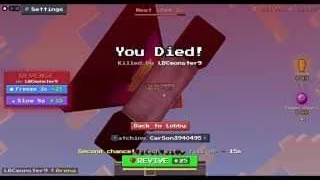
| Revive | 25 | Return to your own pillar after being eliminated. |
| Revenge: Freeze | 25 | Freeze the player who eliminated you for three seconds. |
| Revenge: Slow | 15 | Slow the player who eliminated you for eight seconds. |
Win and death effects announced by 900 Pixels
The official Roblox event is scheduled to start on 24 November 2026 at 21:00 UTC. It names Storm, Rift, Comet, Frost, Chrono and Sandevistan as victory effects and announces separate death effects.
If you want the effect that plays after a win, check the victory label before selecting it. The announcement gives no unlock prices, rarity tiers or equip menu. Those details need a client check once the update is available.
Classes & Spins
Open Classes from the lobby
At 08:25 in ArenaGaming's recording, Classes appears on the bottom bar between Daily and Shop. Use that entry once you return to the lobby. The official regular and Lucky Spin descriptions both name class rolls, so check the type you want and read the resulting class card.
The Classes panel shows the current class and its item description. In the footage below, wait for Current Class and the result before identifying the roll. Names that pass through during the animation are still candidates at that point.
Bouncer, Bomber and Sprinter roll results
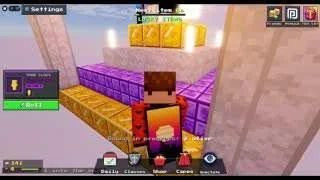
GAME-ZOOM's recording links to 900 Pixels' Roblox place 108114331578868. Between 00:44 and 00:57 the Current Class heading settles on Bouncer, Bomber and Sprinter. The Lucky Spin counter falls while Spins Left stays at 2.
The class cards describe the starting items. Bouncer's Legendary label appears in the owned-class list at 00:46. Potion duration, knockback strength and explosion damage still need gameplay testing.
Completed class results in GAME-ZOOM's footage, reviewed 21 November 2026
| Class | Rarity confirmed | Class card effect | Video time |
|---|---|---|---|
| Bouncer | Legendary | A Knockback Stick. | 00:44–00:46 |
| Bomber | Godly | 3 TNT and 8 wool. | 00:50–00:52 |
| Sprinter | Rare | A Potion of Swiftness. Speed and duration remain unverified. | 00:55–00:57 |

Immortal and Scorcher class cards
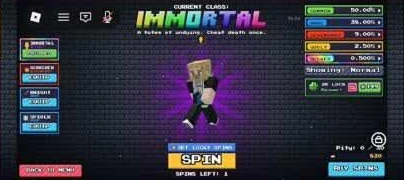
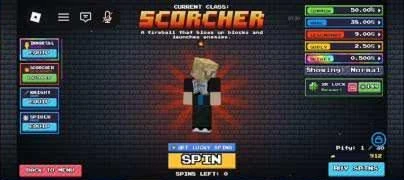
In rexye's recording, Immortal is equipped at 04:20–04:25, with an Equip button on the Scorcher card. At 06:55 Scorcher is equipped and Immortal can be equipped again. The recording establishes that both classes were already owned at 04:20.
The available frames verify what each class gives and how it appears when equipped. The small rarity labels are unreadable and neither first unlock appears in the reviewed footage.
Classes shown equipped in rexye's footage, reviewed 21 November 2026
| Class | Class card effect | Ownership and unlock evidence | Video time |
|---|---|---|---|
| Immortal | A Totem of Undying to prevent one death. | Equipped at 04:20. Rarity and unlock method pending. | 04:20–04:25 |
| Scorcher | A fireball described as destroying blocks and launching enemies. | Already available to equip at 04:20 and shown equipped at 06:55. Rarity and unlock method pending. | 04:20–04:25 and 06:55 |
Match a class’s starting item to your first move
The captured class cards give a starting item to plan around. If you are still learning to cross a gap, check Bomber’s listed wool and keep enough for a stable landing. With Bouncer, stay where you can step back onto your pillar before using the stick. Sprinter’s card lists a potion, so check its live duration before relying on it to cross.
If you own Immortal or Scorcher, read the Current Class label before queuing. The recorded cards describe one death prevention for Immortal and a block-breaking fireball for Scorcher. Scope, activation and damage need a match result before they can be quantified.
Normal Spin odds shown in the recorded panel
The panel is labeled Showing: Normal in GAME-ZOOM's footage at 00:52 and in rexye's footage at 04:20. The rows below are rarity totals displayed in those November captures. Individual class chances and current-build rates still need verification.
The official Lucky Spin description advertises better odds. The recorded Lucky Spin sequence below shows which percentages were on screen.
| Rarity | Displayed Normal chance |
|---|---|
| Common | 50% |
| Rare | 38% |
| Legendary | 9% |
| Godly | 2.5% |
| Secret | 0.5% |
Does Lucky Spin show separate odds?
In GAME-ZOOM's recording, the Lucky Spin balance shows ×2 at 00:47 and ×1 at 00:52. At 00:57, after Sprinter appears, the button changes to Get Lucky Spins. At all three points, Spins Left stays at 2 and the rates panel says Showing: Normal.
The reviewed footage shows the normal table even as the Lucky Spin balance falls. Whether a separate Lucky table can be opened, and what percentages it would show, remain unverified.
Lucky Spin interface in GAME-ZOOM's footage, reviewed 21 November 2026
| Video time | Lucky Spin control | Regular balance | Odds panel label |
|---|---|---|---|
| 00:47 | Lucky Spin ×2 | 2 | Showing: Normal |
| 00:52 | Lucky Spin ×1 | 2 | Showing: Normal |
| 00:57 | Get Lucky Spins | 2 | Showing: Normal |
Regular Spins and Lucky Spins
The regular packs describe class rolls with matching quantities in their names and descriptions. The Lucky products describe class rolls with better odds. For the displayed regular odds, see the Normal panel above.
The official Mega Bundle shows both roll types in one listing, with 25 class rolls and 3 Lucky Spins alongside 7,500 coins and a Rainbow Cape. Check which kind of spin the lobby button will spend before accepting the result.
| Roll type | How to obtain it | What the official description establishes |
|---|---|---|
| Regular Spin | Regular class spin packs and the class rolls in Mega Bundle. | Awards a class roll. The November footage displays Normal rarity odds. |
| Lucky Spin | Lucky class spin packs and the Lucky Spins in Mega Bundle. | Described as a class roll with better odds. The increase, pool and payout need verification. |
Compare the official class spin offers
The Roblox catalog lists regular and Lucky class spins. The Lucky Spin description advertises better odds without giving percentages. Open the class roll screen and check which balance the button uses before confirming.
The three Lucky Spin products have inconsistent names and descriptions in the feed. The table preserves both fields. Use the live purchase prompt to check the delivered quantity before buying.
| Store name | Type | Listed Robux | Store description |
|---|---|---|---|
| 10 Spins | Regular | 99 | 10 class spins |
| 25 Spins | Regular | 199 | 25 class spins |
| 50 Spins | Regular | 349 | 50 class spins |
| 3 Lucky Spin | Lucky | 149 | Says 1 lucky class spin |
| 9 Lucky Spins | Lucky | 399 | Says 3 lucky class spins |
| 30 Lucky Spins | Lucky | 1,199 | Says 10 lucky class spins |
Class rarity labels and spin passes
The 2x Luck Forever listing names Rare, Legendary, Godly and Secret as class rarity labels affected by the pass. The displayed odds with the pass active and its interaction with Lucky Spins still need verification.
Fast Spins adds a SKIP action for jumping to the class result, according to its listing. Check the resulting card before deciding whether to roll again.
| Offer | Listed Robux | Advertised effect |
|---|---|---|
| 2x Luck Forever | 149 | Permanent double luck on class spins. The listing names four affected rarities. |
| Fast Spins | 49 | Use SKIP during a class roll to see the result immediately. |
| Gift: 2x Luck Forever | 149 | The separate developer product gifts permanent class-spin luck to another player. |
Codes & Daily Rewards
Release is the strongest reported code
Roblox Den listed Release as active on 20 November 2026. Pro Game Guides and Destructoid also listed its 500 Coins reward on 19 November. The 900 Pixels Roblox description reviewed 21 November gives no code list. Redemption and current status have not been reproduced in our own client.
The shutdown codes have conflicting reports. The two editorial guides list them as expired, while Roblox Den asks players to check both. The earlier Shutdown1 reward is recorded here so you know which balances to look at if the client accepts it.
| Code | Reported reward | Status in sources |
|---|---|---|
| Release | 500 Coins | Reported active on 19–20 November. Current redemption unverified. |
| Shutdown1 | Historically reported as 10 Lucky Spins and 5 Spins | Expired in two guides on 19 November. Roblox Den lists Check on 20 November. |
| Shutdown2 | Spin reward reported, exact amounts unconfirmed | Expired in two guides on 19 November. Roblox Den lists Check on 20 November. |
Enter the code and check the award
Copy the spelling into Enter a code and select REDEEM. If the panel accepts it, compare the relevant Coins, Spins or Lucky Spins balance before claiming anything else.
If the panel rejects the code, check the spelling, remove any extra spaces and confirm you opened the 900 Pixels game from this Wiki's overview. For a shutdown code, an expired result is consistent with the 19 November reports.
Check the free daily reward in the lobby
The developer advertises free daily rewards for joining its Roblox community, 900 Pixels. Join the group with the account you play on and check the daily reward panel in the original experience. The public description leaves the claim cutoff and reward amounts open.
Pro Game Guides separately reports a lobby chest tied to liking the experience. Read the chest prompt for its requirement. Roblox also lists a 299 Robux Skip Daily Rewards product for the remaining rewards of the current week. That purchase is separate from the advertised free claim.
Towers of Fortune FAQ
When should I cross to the next pillar?
Wait until you can see a landing and have blocks left for the return. A nearby rival already aiming at the bridge is a reason to pause or try a shorter route first.
Which class gives TNT and wool?
Bomber’s Godly result card in the November recording lists three TNT and eight wool. Use the Current Class heading and the item line to check whether the same kit appears after a current roll.
Does the Normal panel show Lucky Spin odds?
The two panels captured here are labeled Normal. One stayed that way as the Lucky balance fell. A readable dedicated Lucky rates panel has not been verified.
Can I tell which pool contains Immortal or Scorcher?
The recording verifies their equipped descriptions, including one death prevention for Immortal and a block-breaking fireball for Scorcher. It leaves their pool membership and first acquisition open.
Where do I look for the daily reward?
900 Pixels advertises free daily rewards for group members. The lobby’s Daily control uses a separate path from the Shop code box. Read the claim state for your account.
Topic coverage
Counts represent editorial topic status in this wiki, not in-game progress or player statistics.