
Dragon Arena Wiki
Official listing referenceHatch elemental dragons, breed new ones, and challenge enemy waves.
Hatch your first dragon, compare the Basic Index with Comet Dragon's two-element nameplate, and follow the recorded Goblin King and Mountain Orc encounters. The guides cover early egg prices in coins, plot upgrades, offline earnings, and where to enter FreeSpin and Release.
Getting started in Dragon Arena
Reviewed
Start at the egg pedestals beside the boards and use the coin label to identify what you are buying. In one November recording, a level 1 Rock Egg showed 500 coins and a level 2 Rock Egg showed 1,000. The developer also advertises a free group egg. Once a dragon hatches, find it on a straw pad and read the nameplate before deciding whether it fills an empty role in your wave team or belongs in a breeding pair.
Use the Basic row of Dragon Index to see which entries you have already discovered. The recording shows Blaze, Icicle, Rock and Tide in that row. Comet appears on a separate plot nameplate with two stars and the Ice and Fire icons. Stars, element icons and levels answer different questions: one describes the visible rating, one identifies the elements, and the other reports the current level. Before breeding, compare both parents and check whether the result you want is actually in the preview. One recorded outcome cannot establish a recipe or probability.
A useful way to spend your early coins is to decide what is holding up the next wave. If a straw pad is empty, another dragon gives you a candidate for the lineup. If your pads are full, check the floor board or look for a better fit among dragons you already own. The Fight End card is a cleaner comparison than the overall coin balance if you bought an egg or claimed an Index reward during the same run. One recorded result paid 9.4K coins; the guide ties this number to its specific attempt.
For Thanksgiving, Roblox lists an event running from 20 November to 4 December around 17:00 UTC. The catalog describes Turkey Eggs as hatching one of five event dragons at levels 20–50. That range describes the offer; it leaves the individual outcomes and their odds open. The Waves Premium Pass describes access to premium rewards for the wave milestones you reach. Read the track and its claim buttons before assuming a purchase grants every milestone reward immediately.
Code status
On 21 November, Roblox still listed FreeSpin for a free Powers Spin. BloxArchive’s 20 November report also lists Release for a Damage Potion. The original game’s Premium Shop footage shows the two inputs. This wiki has not reproduced both reward receipts in the current client.
Read the code checkExplore the wiki.
Gameplay & guides

Dragons, Elements & Breeding
Open Dragon Index to compare the Basic entries with the separately recorded Tide and Comet nameplates. Follow the egg pedestal, hatch and parent-selection screenshots to find the right UI. The breeding preview is the place to compare possible offspring before accepting a pair. The guide also distinguishes permanent breed luck from the one-use Lucky Field offer and covers Thanksgiving eggs and options to keep a named mutation.

Waves, Mobs & Bosses
Use the eight defeat badges as an index of named bosses, then compare the filmed title cards for Goblin King and Mountain Orc. A Fight End example shows where to read the wave, coins and mob total. If progression stalls, retry with one roster change before spending on a continue. The guide also explains the listed Floor 2 and Floor 3 slot bypasses and the Thanksgiving premium reward track.
Coins, Plots & Offline Progress
Compare the filmed 500- and 1,000-coin Rock Egg prices beside their level labels. The same section shows where to find the floor board, how to read a run payout separately from your balance, and why an offline claim deserves its own check. A compact table compares the 219 Robux permanent coin offer with the 49 Robux offline option; the observed prices do not establish a stacking rule.
Updates & reference
Dragons, Elements & Breeding
Find the egg pedestal, hatch a dragon and start breeding
Find the egg pedestals by the boards at the edge of the arena. At 02:25 in Berlian kecil's November 19 playthrough, a PC interaction prompt appears beside a pedestal. Check the egg shown above it before interacting. After hatching, check your plot's straw pads for the new dragon and open Index to see your discoveries.
To breed, use the heart button at the bottom of the screen and select two dragons on the plot. At 06:05, two parent slots are filled and the preview shows several possible results beside Breed. Check the parents and the preview first. A single result from this run cannot establish the odds or a guaranteed combination.
Read stars, level and elements separately
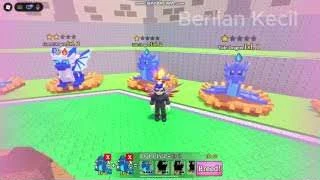
A nameplate at 05:45 shows a one-star Tide Dragon at level 1 with a water droplet. At 08:15 the plot shows a two-star Comet Dragon with snowflake and flame icons. Check all three labels before swapping a dragon into your fight team. The footage verifies these specimen labels. It leaves hatch rates, breeding recipes and elemental damage multipliers open.
Visible dragon nameplates in the November 19 run
| Dragon | Stars shown | Elements shown | Video time |
|---|---|---|---|
| Tide Dragon | 1 | Water | 05:45 |
| Comet Dragon | 2 | Ice and Fire | 08:15 |

Four Basic Index entries and Comet Dragon
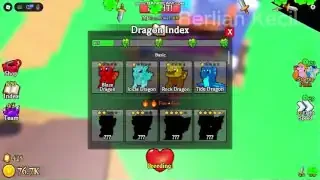
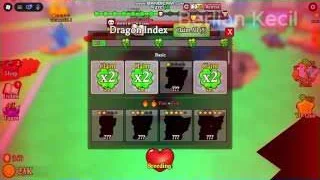
Open Index from the plot and check the Basic row. At 09:00 in Berlian kecil's recording, all four entries in that row are revealed. Compare the named cards with the separate Comet nameplate at 08:15. If you are aiming for a particular discovery, check whether the name is on a revealed card or among the possible breeding results before committing the pair.
Recorded Dragon Index and nameplate entries reviewed 21 November 2026
| Dragon | Where it appears | Video time |
|---|---|---|
| Blaze Dragon | Basic Index | 09:00 |
| Icicle Dragon | Basic Index | 09:00 |
| Rock Dragon | Basic Index | 09:00 |
| Tide Dragon | Basic Index and a one-star Water nameplate | 09:00 and 05:45 |
| Comet Dragon | Plot nameplate with two stars and Ice and Fire icons | 08:15 |
Compare two pairings before you breed
At about 06:05 in Berlian kecil’s run, the two selected parent slots are highlighted at the bottom of the plot. The possible offspring appear separately near Breed. If you are looking to fill an Index silhouette, compare the proposed outcomes with the entries you already have.
Change one parent and read the new preview before confirming. Keep a note of the two selected nameplates and the result you actually hatch. The recording shows a preview, so read the current display for any probabilities or duration on your own pairing.
Read the Index, plot and breeding preview together
The November 19 recording of the original place documents where to check collection data and preview the results of a proposed pairing.
Dragon Index, hatching and breeding in the recorded run
| Video time | Screen | Visible evidence |
|---|---|---|
| 02:25 | Egg pedestal | Egg and interaction prompt |
| 03:20 | Dragon Index | Discovered entries and unfilled silhouettes |
| 05:45 | Plot | One-star, level 1 Tide Dragon |
| 06:05 | Breeding preview | Two parent slots and possible results |
| 08:15 | Plot | Two-star Comet Dragon with Ice and Fire icons |
Check Index claims after a new discovery
Open Index after hatching or merging and check whether a silhouette became a named entry. The November 19 walkthrough description also names Swamp, River and Boulder and reports claiming Index rewards. It does not publish their nameplate readouts, so use these names as search leads for the Index.
If you have a claim available, compare the released reward and your balance before spending on Roll Luck. Record the next displayed floor or slot requirement separately. That keeps the discovery reward separate from wave coins and any paid floor bypass.
What the developer confirms
The developer names Fire, Water, Rock and Ice and describes unique five-star dragons. Open Dragon Index to compare discovered entries. In the recording, undiscovered entries appear as silhouettes. Check the preview for the pairing you have selected before committing either parent.
Treat an element icon as an identification clue, not a confirmed damage bonus. The public listing does not say which dragons carry one or multiple elements, how inherited elements work, or whether a five-star dragon is guaranteed by any pairing.
Free egg and egg pedestal purchases
Check the group reward first. The official listing advertises a free egg for joining Vegle & Data 3. It does not name the egg, publish the hatch pool or show which button claims it.
The Roblox product catalog names Rock Egg and Blaze Egg at 19 Robux each, Tide Egg at 29, and Frost Egg at 39. It also lists hybrid-sounding names such as Emberstone Egg and Steamcore Egg at 59 each. These entries describe buying the egg waiting on the pedestal. The product names do not establish parent combinations or hatch odds.
Check the time left before buying a hatch skip. The store listed Tiny under 1 minute for 9 Robux, Little under 5 minutes for 29, Medium under 15 minutes for 99, Big under 1 hour for 129, and Huge above 1 hour for 199. These are the catalog's descriptions as of 18 November, so confirm the offered item before paying.

Breeding luck: permanent upgrades and Lucky Field
The Roblox developer-product descriptions for Vegle & Data 3, checked 20 November 2026, distinguish lasting breed luck from a charge for one attempt. The displayed multiplier applies to the advertised luck variable. The listing does not give individual breeding odds or a stacking rule.
| Product | Robux | Listed effect | Scope |
|---|---|---|---|
| More Breed Luck | 119 | 1.2× breed luck | Permanent |
| Insane Breed Luck | 399 | 2× breed luck | Permanent |
| Instant x2 Luck (Lucky Field) | 49 | 2× luck | Next breed only |
Breeding time and keeping Maple or Golden
The 20 November product catalog lists x2 Breed Speed at 299 Robux and describes a permanent speed upgrade. Keep Maple Mutation costs 239 Robux and Keep Golden Mutation costs 59 Robux. Each keep product describes preserving its named mutation on the egg you just bred. Check the mutation shown on your result before spending. The listed prices give no breeding odds.
Thanksgiving Event and Turkey Eggs
Vegle & Data 3's official event for place 83694443310872 is scheduled from 20 November around 17:00 UTC to 4 December around 17:00 UTC, as checked on 20 November. The announcement advertises a new boss, mobs and dragons. The product catalog says Turkey Eggs hatch one of five Thanksgiving dragons. The announcement and catalog leave their individual names, elements, and drop or hatch odds unlisted.
Dreadhorn, Turkey Egg and Emerald mutation
The official product catalog reviewed 18 November lists Dreadhorn Egg bundles in sizes 1, 3 and 10 for 99, 219 and 799 Robux. The Turkey Egg listings show the same prices and advertise a hatch from a pool of five Thanksgiving dragons at level 20–50. The ten-egg Turkey bundle also lists one Emerald Star. The listings do not establish when the eggs can be bought or the odds for a particular hatch.
Keep Emerald Mutation costs 199 Robux and describes keeping the mutation on the egg you just bred. Check the breeding result for that trait before looking for a keep option. On 20 November the official catalog also listed Thanksgiving Bundle for 1,499 Robux without an itemized description. The five individual Turkey Egg hatch outcomes and the bundle contents still need an Index or shop capture.
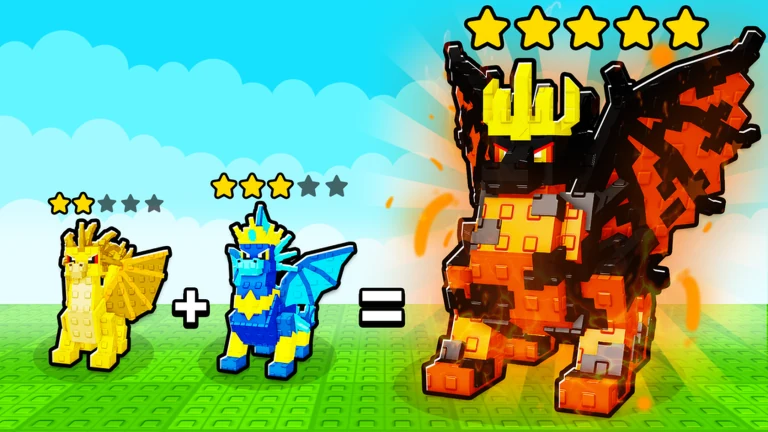
Waves, Mobs & Bosses
Check the wave result before continuing
Use Fight above the arena to start the wave encounter. In the November 19 recording the loss panel at 04:25 shows the wave reached, coins earned and mobs killed. Choose No Thanks if you want to return to your plot and change the team. Use the loss panel to see whether another attempt progressed farther before spending on a continue.

Recognize Goblin King and Mountain Orc
The boss title appears before the regular combat view returns. Pocket Codes enters the original place linked in the description and shows Goblin King at 00:14. Nin's recording shows Mountain Orc at 01:40 in the same arena layout. In the official badge list, the Goblin King encounter is called King Goblin.
| Boss title in game | Roblox defeat badge | Clip |
|---|---|---|
| Goblin King | Beat King Goblin | Pocket Codes · 00:14 |
| Mountain Orc | Beat Mountain Orc | Nin · 01:40 |


Find a boss by its Roblox badge
Use the official defeat badges to match a boss name to the result of your run. Search in this table by name with your browser's Find command. The badge catalog leaves the spawn wave, health and coin reward open.
| Boss | Evidence in the available sources |
|---|---|
| King Goblin | Official defeat badge |
| Mountain Orc | Official defeat badge and the November 19 walkthrough description |
| Ent | Official defeat badge |
| Fighting Boar | Official defeat badge |
| Magma Golem | Official defeat badge |
| Minotaur | Search Roblox Badges for the spelling Minotaure. |
| Shadow Knight | Official defeat badge |
| Gargoyle | Official defeat badge |
Use Fight End to decide what to change
The November 19 gameplay capture shows three separate results: wave reached, coins earned and mobs killed. If you are farming coins, record the payout and approximate run time. If your goal is a boss badge, compare the wave result and your badge list after the fight.
When a run stalls, compare two attempts at the same encounter with one roster change. Start with a dragon you already own and compare its level and element icons before considering an extra slot or a paid continue.
Thanksgiving Waves Premium Pass
The 20 November official catalog listed Waves Premium Pass (83144482) at 499 Robux. The description says it unlocks the Premium rewards for every wave step you reach in the Thanksgiving pass. Check the pass panel for reached milestones and which rewards show as claimable. Free-track rewards, premium item quantities and specific wave gates need readable gameplay panels.
Mountain Orc in the November 19 run
Berlian kecil's exact-place video description reports encountering Mountain Orc during a run that passed Wave 55. The Roblox badge confirms the boss name. The description does not show which wave first spawns it or its coin payout, so the reported run milestone and boss schedule are separate facts.
The confirmed combat loop
The developer's Roblox description says your dragon army defeats mobs and bosses in waves and earns coins. It also encourages mixing elements to reach higher waves. That establishes the broad loop, but not a fixed best team, an element counter system or a guaranteed boss schedule.
When a wave is difficult, compare the enemies shown in that wave with the dragons you can actually field. Change one team slot at a time and retry the same wave; note whether the result changes before investing more coins. This is a testing method, not a claimed hidden mechanic.
When a wave stops your team
If you lose a wave, compare two choices: change one team slot and retry, or use the listed Revive & Continue product when offered. The developer catalog advertises reviving your dragons at full health and resuming at the lost wave for 29 Robux. It does not guarantee the next wave clear or describe what happens after another defeat.
Before buying a slot, check the relevant floor in your plot. The store describes slot purchases as bypasses for Floor 2 or Floor 3. It gives no coin cost for unlocking those floors.
| Slot | Robux | Listed floor bypass |
|---|---|---|
| 4 | 49 | Floor 2 |
| 5 | 49 | Floor 2 |
| 6 | 99 | Floor 3 |
| 7 | 99 | Floor 3 |
Dragon Power Spins and VIP Club
The 20 November Roblox product feed describes spins as rolls for new dragon powers. Its offers do not publish the ability pool, the odds, or the rules for replacing a current power. Read the selected dragon and the confirmation prompt before rerolling. Check a wave result with the same team before attributing a change to a newly rolled power.
| Product | Robux | Advertised benefit |
|---|---|---|
| 1 Power Spin | 75 | One roll for a dragon power |
| 3 Power Spins | 329 | Three rolls |
| 10 Power Spins | 499 | Ten rolls |
| VIP Club | 349 | +50% coins, +50% breed luck, one additional Dragon Arena slot and two Goldmelons |
Fight Speed, Power Spins and potions
If a retry is slow, the store advertises x2 Fight Speed for 59 Robux. If you are looking for a different dragon power, the 75 Robux 1 Power Spin product describes a roll for a new power. See Codes for the developer-listed FreeSpin before buying a spin.
The same catalog lists Damage, Defense, Health and Speed Potions. The single-potion listings were 49, 39, 69 and 79 Robux respectively on 18 November. In the recording, Premium Shop labels Speed Potion as five minutes. Other potion durations, stat changes, boss health and guaranteed wave drops still need gameplay evidence.
Coins, Plots & Offline Progress
Choose between another egg and a plot upgrade
The run shows coin prices over eggs beside the arena and locked floors above the plot. If you have an empty straw pad, an affordable egg gives you another dragon to consider for the team. If your pads are already full, check the next floor or slot price before rolling more eggs. The on-screen egg price can vary by the selection, so read the pedestal you are about to use.
After a fight, start with Coins Earned on the Fight End panel. An egg purchase or plot upgrade immediately afterward can obscure the payout if you only look at the balance. Keep the reward screen in view when you compare one team against another.

Recorded Rock Egg prices and where to check your next floor
At the egg pedestal, read the egg level and the gold coin price together. Nin's footage shows two different prices for Rock Eggs. Inspect the pedestal each time you return before committing your coins. The boards behind the pedestals are a separate check for floor progress.
Early coin prices shown in Nin's run, reviewed 21 November 2026
| Egg on the pedestal | Displayed price | Video time |
|---|---|---|
| Rock Egg Lvl. 1 | 500 coins | 01:10 |
| Rock Egg Lvl. 2 | 1,000 coins | 23:50 |


Compare wave payouts and offline claims
Berlian kecil's Fight End screen at 04:25 shows 9.4K under Coins Earned. That is a payout for one recorded run. Use the same field to compare runs as you upgrade your team, and keep the return-to-game payout in a separate line if you are checking offline coins.
| Offer | Listed price | Description scope |
|---|---|---|
| x2 Coins | 219 Robux | Permanent doubling of coin earnings |
| x2 Offline Earnings | 49 Robux | Doubling coins earned while away |
Where progression is confirmed
The Dragon Arena listing connects coin earning to defeating mobs and bosses on waves. It says evolving your plots unlocks features and that dragons fight while you are offline. The public text does not publish the cost of a plot upgrade, the unlock order, an offline income cap or the formula behind a reward.
For a useful first-session record, note your coin total before and after a wave, the highest wave reached, and the next plot upgrade displayed in the current build. Keep wave rewards separate from any one-time claim or event reward so the two are not mistaken for the same coin source.
Wishing Well and prize wheel listings
The official catalog names the Wishing Well and Wheel Spin Tickets. Look for the matching prompt in the game before spending. The feed does not list their reward pools, odds or a route to earn tickets for free.
| Offer | Robux | Listed scope |
|---|---|---|
| Wishing Well Wish | 29 | One wish for a random reward |
| Wheel Spin Ticket | 49 | Single ticket listing |
| Wheel Spin Ticket x5 | 199 | Five-ticket listing |
Checking offline progress
The 20 November official catalog lists x2 Offline Earnings (80920599) at 49 Robux. It advertises doubling the coins dragons earned while you were away. The listed effect specifically names offline coins. Its activation window, payout cap and ordinary coin rate still need a return-screen check.
Record the displayed wave and coin totals before leaving the game and the first values shown after returning. Also note the time away and any offline summary screen. Check the base payout before considering a paid claim. The available evidence leaves the offline cap, minimum time away and stacking with x2 Coins open.
Codes
Code shown by the developer · 20 November 2026
The official Roblox description for Vegle & Data 3's place 83694443310872 still listed FreeSpin for a free Powers Spin on 20 November 2026. A current-client result pairing that exact code with the reward remains unverified.
In the November 19 recording, the left-side Shop opens Premium Shop. Scroll down past the potion offers to the Codes box, enter FreeSpin and select Redeem. The input is visible at 01:25. This confirms where to enter the code. We have not reproduced a successful redemption in the current client.

FreeSpin and Release reward evidence
BloxArchive reported both codes working on 20 November at 18:17 UTC. The original-place footage shows the two entries in the Premium Shop and its description reports a spin and a potion. The code input frames do not show a readable reward receipt for each string.
| Code | Reported reward | Evidence | Shop footage |
|---|---|---|---|
| FreeSpin | Free Powers Spin | Roblox developer listing and BloxArchive report | Berlian kecil · 01:25 |
| Release | Damage Potion | BloxArchive report and earlier GGRecon listing | Berlian kecil · 01:40 |

Where to use a Powers Spin
After the shop confirms your reward, look for the Dragon’s Power stand by the plot. At 22:00 in Nin's run, the interaction prompt says Roll Powers. Egg rolling uses a conveyor with a separate Spin Eggs label. Read the selected dragon and the roll prompt before using a spin.

Check the result before retrying
Open Shop, scroll to Codes beneath the potion offers, and enter one string at a time. Read the response and check the Power Spin count or potion inventory before entering the other code. An error or a previously claimed message can be specific to your account. These source dates do not establish acceptance in the current client.
Dragon Arena FAQ
Does the Comet nameplate tell me the breeding recipe?
It confirms the observed two stars and Ice and Fire icons. Read the current breeding preview with both parents selected for possible offspring. A finished dragon does not identify which parent pair made it.
Do all Rock Eggs cost the same number of coins?
The two filmed prices differ by level. Read the tiny level label on the egg as well as the gold coin number. Keep the in-game price separate from the product catalog’s Robux listing.
Where do I use a Powers Spin?
Look for Dragon’s Power by the plot and the Roll Powers prompt. Check which dragon is selected before confirming. There is also a separate Spin Eggs conveyor near the egg pedestals.
Where do coins earned while away appear?
Check the first return screen and your balance before buying or collecting anything else. Roblox’s listing says dragons fight offline. The amount, cap and exact claim window still need paired gameplay checks.
What can I verify when I meet a new boss?
Read the title card and the Fight End panel, then check whether the defeat badge appeared. The guide includes eight badges. The title card alone cannot establish the first wave that spawns a boss.
Topic coverage
Counts represent editorial topic status in this wiki, not in-game progress or player statistics.